Collection Basics
In this module, you'll become familiar with the simulated REST server, and then set up a simple REST collector in Cribl Stream. Some of the steps will involve testing at the command line, which will use the curl command.
While we've provided you with a terminal window during this course (here at Cribl, we try to be helpful like that) we know you might want to try things out on your machine to be sure we haven't done any behind-the-scenes razzle-dazzle and that the results you see today are the same ones you'll get in the office when you're trying this stuff out for real.
If that's the case, make sure you have the curl utility installed:
- on Linux, install with either
sudo apt install curl(for .DEB based distros) orsudo dnf install curl(for RedHat/CentOS based distros) - on Mac, install with
brew install curl - on Windows,
curlshould already be installed! (presuming you're using a version of Windows that's been out since 2017)
To verify that curl is installed and working, open a terminal/command prompt window and run the command curl --version. You should see a response that looks something like this:
curl 8.14.1 (x86_64-pc-linux-gnu) libcurl/8.14.1 OpenSSL/3.5.3 zlib/1.3.1 brotli/1.1.0 zstd/1.5.7 libidn2/2.3.8 libpsl/0.21.2 libssh2/1.11.1 nghttp2/1.64.0 librtmp/2.3 OpenLDAP/2.6.10
Release-Date: 2025-06-04, security patched: 8.14.1-2ubuntu1.3
Protocols: dict file ftp ftps gopher gophers http https imap imaps ipfs ipns ldap ldaps mqtt pop3 pop3s rtmp rtsp scp sftp smb smbs smtp smtps telnet tftp ws wss
Features: alt-svc AsynchDNS brotli GSS-API HSTS HTTP2 HTTPS-proxy IDN IPv6 Kerberos Largefile libz NTLM PSL SPNEGO SSL threadsafe TLS-SRP UnixSockets zstd
What Data Are We Using?
For this lesson, we'll be using data from dummyjson.com. There are multiple sets of data - from users to recipes to quotes and more. Each section will use whichever data set (API endpoint) is most appropriate to highlight the core concept(s) we want to teach. You're welcome to dig through the docs over at dummyjson.com, but depth familiarity is not at all necessary to complete this lesson.
Testing with curl
Let's take a minute to verify the data from dummyjson.com is working, but also that the data we'll be collecting in Cribl matches the data that you could get manually on your own system. Open a terminal / command prompt window on your system and your Sandbox terminal and run the following command:
curl https://dummyjson.com/todos/1
You will receive a response:
{"id":1,"todo":"Do something nice for someone you care about","completed":false,"userId":152}
Congratulations! You've successfully obtained sample data from the server.
Configure REST Collector in Cribl Stream
Now we'll configure the same curl command as a REST Collector in Cribl Stream.
OK, let's make this clear - we're going to give you the following instruction A LOT. So feel free to memorize it now and you can sing along with the instructions like it was your favorite Taylor Swift song.
Navigate to the REST Collector Source page. From the top nav of your Cribl Stream Sandbox, with Manage active, select Data > Sources, then select Collectors > REST from the Data Sources page's tiles. Click Add Collector to open the REST > Add Collector modal, which provides the following options and fields.
Note: If you do not see any Collector tiles, make sure you disable any ad blockers on the Cribl Sandbox's browser tab.
-
In the Collector ID field, enter
json_placeholder. -
In the Collect URL field, enter
'https://dummyjson.com/todos/1'Note: the quotes are important! This is a JavaScript expression–enabled field, and you must either wrap static strings inside quotes (single or double), or use the backtick ( ` ), for template literal (string) evaluation.
-
At the bottom left, click ► Save & Run. In the Run configuration modal, click Run again.
Note: If you do not see any Collector tiles, make sure you disable any ad blockers on the Cribl Sandbox's browser tab.
-
In the Collector ID field, enter
json_placeholder. -
In the Collect URL field, enter
'https://dummyjson.com/todos/1'Note: the quotes are important! This is a JavaScript expression–enabled field, and you must either wrap static strings inside quotes (single or double), or use the backtick ( ` ), for template literal (string) evaluation.
-
At the bottom left, click ► Save & Run. In the Run configuration modal, click Run again.
We'll discuss filtering data later in this course.
In the Preview modal, the resulting output should match what you obtained using the curl command.
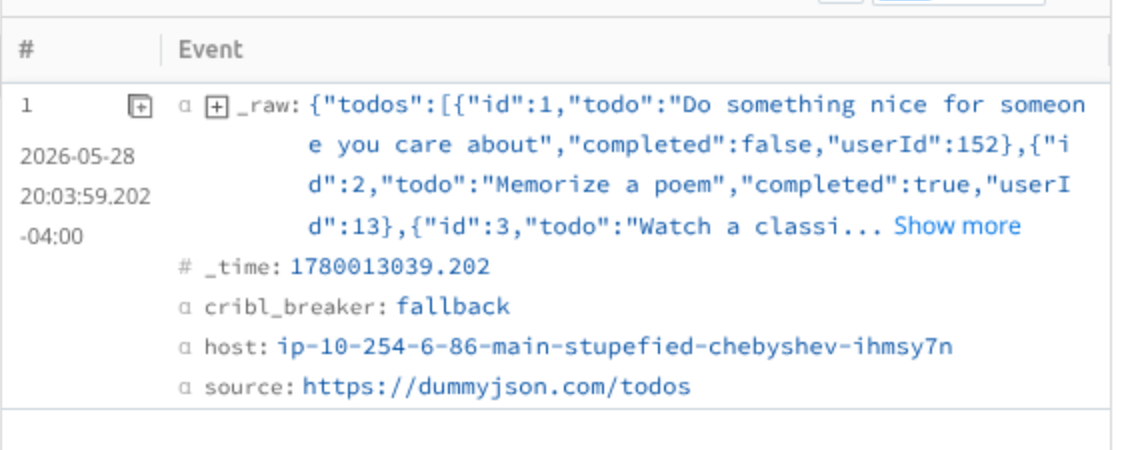
You might already have a few questions about all of this:
- Why is the output split into multiple records?
- What happens when I retrieve more than one record worth of data?
- How do I handle API parameters like data ranges, paging, or specific record IDs?
- How do I extract "the good stuff" from the complete API response?
NOT TO FEAR! We are going to get to those questions and more in the coming modules.
Conclusion
For now, bask in the glow of achievement. You've set up a simple Collector to pull data and generate events from REST API data!
In the next module, you'll understand how Discovery works with Collection...