
Run Collector Run
Course Map
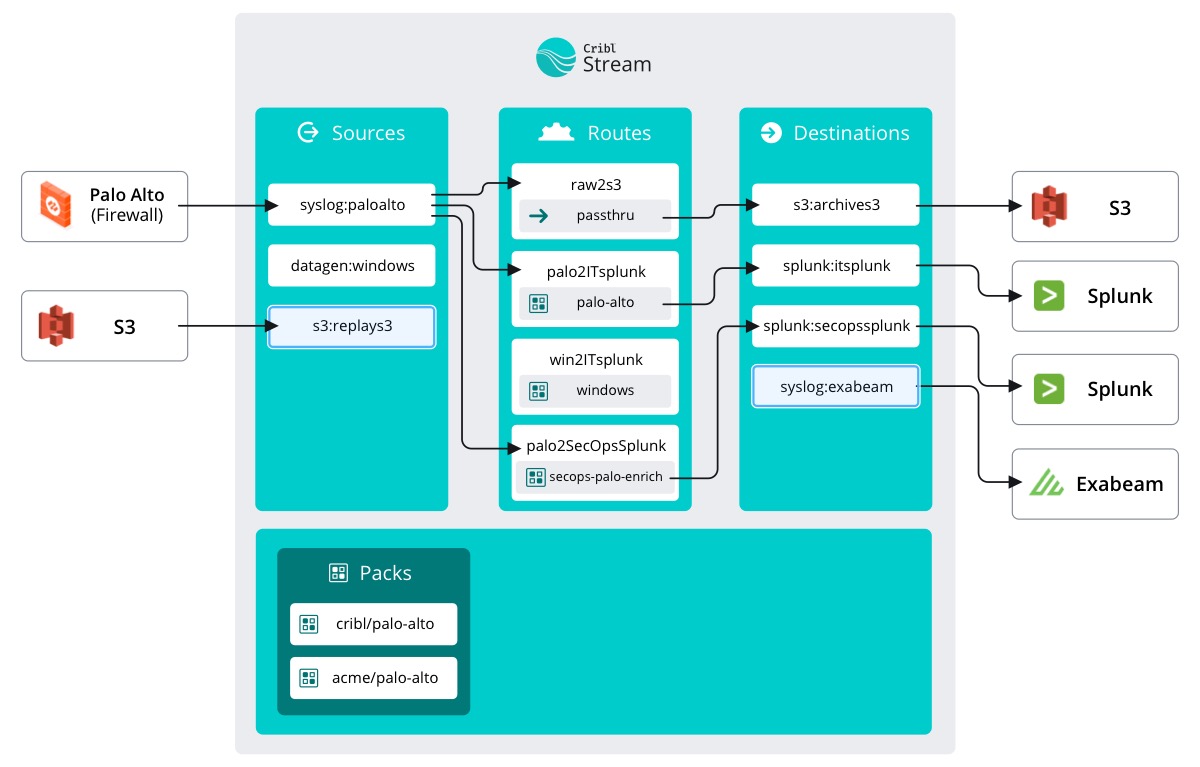
Visualizing data flow in this scenario is a little tricky because it isn’t constant. We configured the Source as an on-demand Collector. This means it only collects when we tell it to. This configuration is great for exactly what we're doing (moving data from one place to another as a one time job). You can also set up a schedule for the Collector to run at certain times in perpetuity. Scheduled Collectors are great for repeat batch jobs.
important
Run the collector
- Click
Runin the Actions column ofs3replay - Under Mode click
Full Run - Click
Run
View the Results
Now the Collector is fetching our archived data from S3 and supposedly streaming it towards the new SIEM. Collections can happen pretty quickly, after all Stream is built to handle gigabytes per second. Therefore, to prove data flow we turn back to the Monitoring tab.
important
Click Monitoring on the top nav
There should be a large spike in the main graphs here: events in and out and bytes in and out. It can be kind of hard to see if there is a lot of data flowing through, however. Let’s get a little more granular.
Zoom In
important
View data by destination
- Click the
Datasubmenu on theMonitoringpage - Select
Destinationsfrom the dropdown
Here we see a list of all of our configured Destinations. If we look at the Total columns for the exabeam row, we can see proof that data has flowed!
It might not look amazing, but Steve will be pleased as punch when he comes back from his PTO. Good job!
Next up: Help SecOps investigate a security breach!
Cribl.Cloud
There's a party and you're invited! We'll bring the Cribl, you bring the data. Sign up for a Cribl.Cloud account to try out what you just did with your own data. Up to 1TB / day of ingest at absolutely no cost! Neat! And no need to use valuable resources or infrastructure getting Cribl up and running. We’ll take care of that. And the updates. And feeding the goats. Just bring your own data (BYOD)!
AWS Quick Start
Got your own AWS infrastructure and want to try Cribl there? No worries, we also have an AWS Quick Start for Cribl Stream!